Find a conversation
The Conversations tab, its filters, and what each status means.
Open Inbox, then Conversations. It lists the 200 most recent conversations, newest activity first.
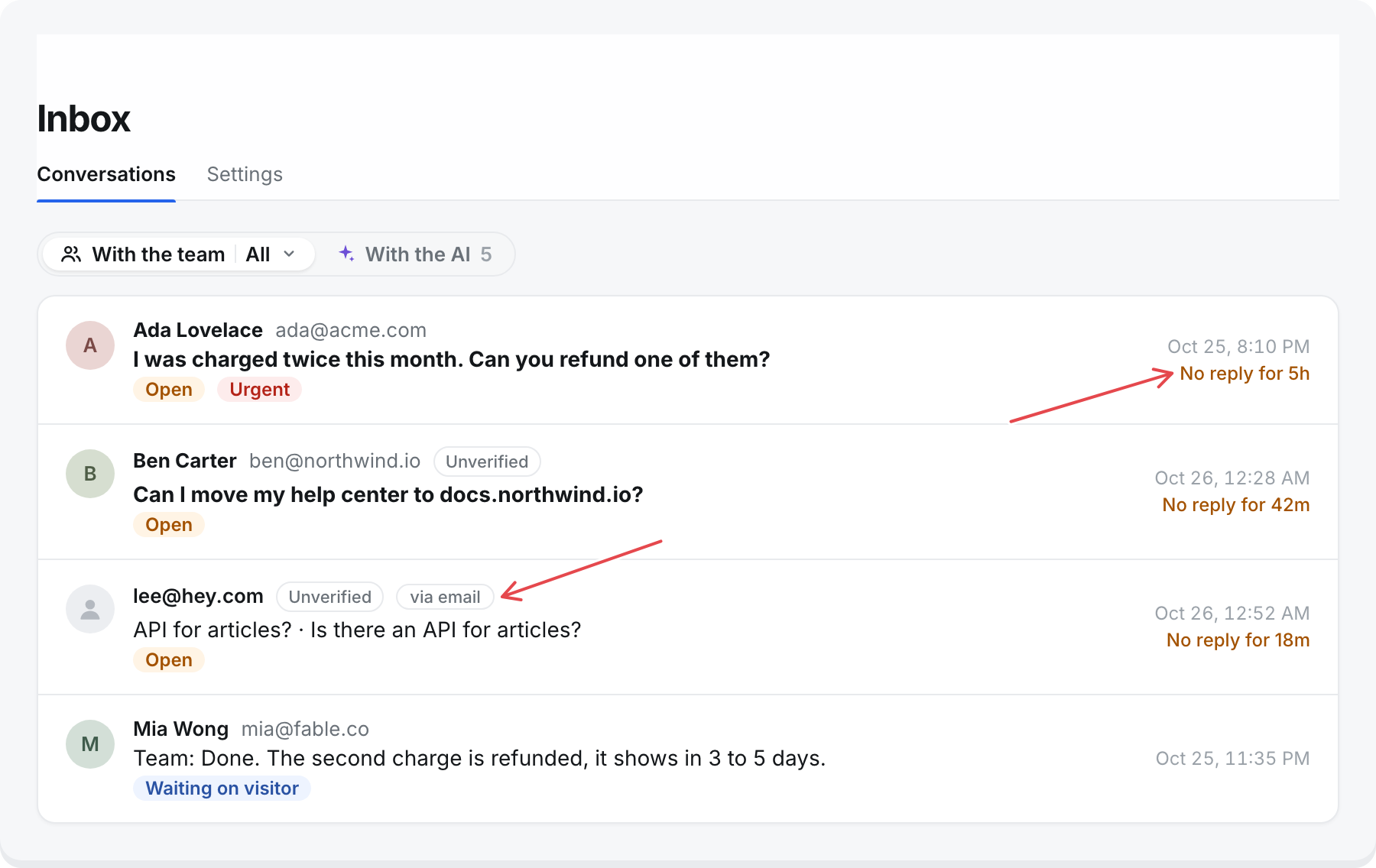
With the team or with the AI
The switch at the top has two sides, each with its own lists:
- With the team: conversations handed to your team.
- With the AI: messenger conversations the AI is still answering, never handed over.
Select the other side to switch to it. Select the side you are on to pick another of its lists. The number on the other side counts what is not done there: Open and Waiting on visitor for your team, Needs a look and Ongoing for the AI.
With the team
| List | Shows |
|---|---|
| Open | Waiting on your team. Selected by default. |
| Mine | Open or waiting on the visitor, and assigned to you. |
| Waiting on visitor | Your team replied last. |
| Resolved | Closed by your team. |
| All | Every conversation handed to your team. |
| Spam | Moved to spam. Hidden from every other list. |
With the AI
| List | Shows |
|---|---|
| Needs a look | The AI could not answer something, and the visitor has gone quiet. Selected when you switch to the AI. |
| Ongoing | The visitor wrote in the last 30 minutes. |
| Resolved | Resolved while the AI has it. See below. |
| All | Every conversation the AI still has. |
The number next to a list is how many conversations are in it, not how many are unread. Resolved and All show no number.
What the AI resolved
A conversation the AI has is Resolved when:
- The visitor selects This helped under an answer, or replies only with thanks, like "Thanks, that worked". It counts at once.
- The visitor has been quiet for 30 minutes after answers from the help center.
- A teammate selects Resolve on it. See Assign, resolve, and reopen.
It Needs a look when the visitor has been quiet for 30 minutes and the AI could not answer something: nothing in the help center covered it, the answer said the help center does not cover part of the question, or the month's credits had run out.
If the visitor writes again, the conversation is Ongoing again and the AI answers. None of this shows in the messenger. To reach the visitor, reply: that takes the conversation over.
Statuses
A conversation is always in one of these:
- With the AI: the visitor is talking to the AI. Your team can read it, and replying takes it over. In the list it shows as With the AI, Needs a look, or Resolved.
- Open: waiting on your team.
- Waiting on visitor: your team replied, and the visitor has not written back. A reply sets this. You cannot set it by hand.
- Resolved: done. If the visitor writes again, it goes back to Open.
Each row
- The person's name or email, or Anonymous visitor.
- via email for conversations that came in by email, with the subject.
- The last message, starting "Team:" or "AI:" when it was not the visitor.
- The status and how long ago it changed.
- Urgent when it meets an Urgent rule. See below.
- "No reply for 4h" when it has waited on your team.
Bold rows are ones you have not opened since the last message. Opening one marks it read for you only.
Urgent
A conversation waiting on your team is marked Urgent when any of these is true, and comes first under Open and Mine:
- Signed in: a customer you verified in the messenger. See Identify signed-in users. Email conversations do not count.
- Waiting: they have waited longer than your limit since their last unanswered message.
- Unanswered messages: they have sent more messages than your limit since your team last replied.
Hover over Urgent to see which. Conversations that match more of these come first.
Set the limits under Inbox, then Settings, then Urgent:
- Waiting longer than (hours): 1 to 168. Starts at 4.
- Unanswered messages: 1 to 20. Starts at 3.
Search
There is no search box. To find conversations about one question, open Messenger, then Analytics, and select the question under Asked most or Not in the help center. The inbox opens filtered to those conversations.
Open a conversation
Select a row to open it next to the list. Select Open conversation ↗ for the full page, or × to close it.
At the top, a line says how your reply will reach the person:
- "Replies reach them in the messenger, and by email at ada@acme.com once they have left."
- "No email on file: replies reach them only in the messenger."
- "Wrote by email: replies go to ada@acme.com in the same thread."
The transcript shows each message with who sent it: the visitor, AI, a teammate, or Note for internal notes. It also shows each change, like "Priya took this over from the AI" or "Sam resolved this". When the visitor is in the messenger, it says "Ada is typing…" or "Ada has the messenger open now".
The person's details show only their name, email, and Verified or Unverified. Their other conversations are not linked.
Conversations from the old Messenger page
Links to Messenger, then Conversations now open Inbox, then Conversations, with the matching filter.