Reply to a conversation
Send a reply or an internal note, attach files, rewrite with AI, and undo a reply you just sent.
Open a conversation from Conversations. The box at the bottom has two modes: Reply and Note.
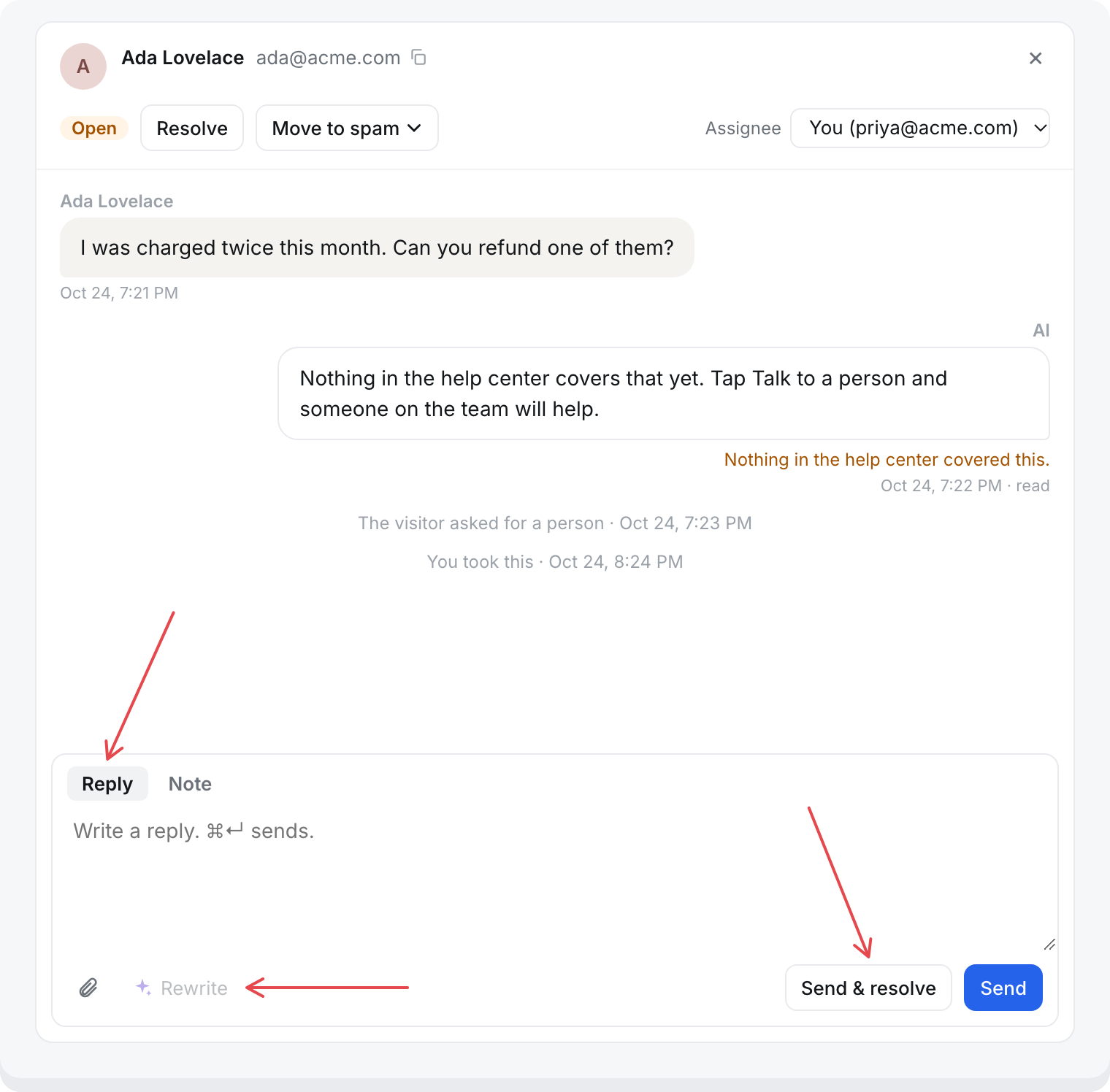
Send a reply
- Choose Reply.
- Write your message. It can be up to 8,000 characters.
- Select Send, or press ⌘ Enter (Ctrl Enter on Windows). To close the conversation as well, select Send & resolve.
The reply goes to the visitor in the messenger, or by email if they have left. See Talk to a person for what they see.
Sending a reply also:
- Sets the status to Waiting on visitor, or Resolved with Send & resolve.
- Assigns the conversation to you, if nobody has it.
- Takes it over from the AI, if the AI still had it. The AI stops answering it.
You can also answer from your own mailbox. See Email in the inbox.
Undo a reply
Your replies wait 8 seconds before they go out. While they wait, the box shows "Sending in 8s. Undo · Send now".
- Undo takes the reply back. The visitor never sees it, the text goes back in the box, and the status and assignee go back to what they were.
- Send now sends it straight away.
Once a reply has gone, you cannot undo it.
To send immediately every time, open Inbox, then Settings, and under Just for you turn off Hold my replies 8 seconds before they go out. This changes it for you only.
Leave a note
Choose Note, write it, and select Add note, or press ⌘ Enter.
- Only your team sees notes. They are never shown or emailed to the visitor.
- Notes do not change the status, and the visitor does not see you typing.
- Notes cannot be undone.
Attach files
Select the paperclip, or paste a screenshot into the box.
- Pictures (PNG, JPEG, GIF, WebP), PDFs, and text files (.txt, .log, .csv, .md, .json). SVG files are not allowed.
- Up to 4 MB each, and 5 files a message.
Files are not public. Each one opens through a link that works for a few minutes only.
Rewrite with AI
Write a draft, then select Rewrite and choose:
- Polish: fixes grammar and wording, clear and warm.
- Friendlier: warmer and more personal.
- Shorter: to the point, every step kept.
- In their language: translates into the language the customer writes in. Only for replies, not notes.
The rewrite replaces the text in the box. Select Undo rewrite to get yours back. Nothing is sent until you send it.
Rewrites use no credits. Each teammate can rewrite 10 times a minute and 200 times a day. The daily count resets at midnight UTC.
Conversations from before the inbox
Some messenger conversations started before your workspace had the inbox. Replies cannot reach those visitors, so only notes can be added.